 lab2 ·
 Help for lab2.dataspacebuilder.com
lab2 is an experimental installation of nexyo fabric. It runs the newest development version of the platform for tests and demos.
1. Orientation
nexyo fabric is the software for trusted data sharing between organizations. In lab2, people use one entry point: nexHub. nexHub signs you in and shows the services of your workspace. The services start from nexHub with single sign-on (SSO), so you sign in only once.
Other addresses of lab2 are technical interfaces. Other systems use them, not people.
Hilfe für lab2.dataspacebuilder.com
lab2 ist eine experimentelle Installation von nexyo fabric. Hier läuft die neueste Entwicklungsversion der Plattform für Tests und Demos.
1. Orientierung
nexyo fabric ist die Software für Trusted Data Sharing zwischen Organisationen. In lab2 nutzen Menschen genau einen Einstieg: den nexHub. Der nexHub meldet Sie an und zeigt die Dienste Ihres Workspace. Die Dienste starten aus dem nexHub mit Single Sign-On (SSO). Sie melden sich also nur einmal an.
Die übrigen Adressen von lab2 sind technische Schnittstellen. Diese nutzen andere Systeme, nicht Menschen.
Addresses
| Address | What it is | Who uses it |
|---|---|---|
hub.lab2.dataspacebuilder.com | nexHub: sign-in, workspace, start of services | People |
ds.lab2.dataspacebuilder.com | nexDS: data space application | People, started from nexHub |
dpp.lab2.dataspacebuilder.com | nexDPP: Digital Product Passport | People, started from nexHub |
oauth.lab2.dataspacebuilder.com | Identity provider for single sign-on | Systems |
nexus.lab2.dataspacebuilder.com | Nexus runtime API | Apps and agents with a token |
connector.lab2.dataspacebuilder.com | Connector for the data space protocol | Connectors of other Participants |
identity.lab2.dataspacebuilder.com | Identity Hub: DIDs and Credentials | Other Participants and verifiers |
issuer.lab2.dataspacebuilder.com | Issuer of Credentials | Other Participants and verifiers |
2. Sign in to nexHub
You need an e-mail address and a password. The lab2 team gives them to you. There is no self-registration.
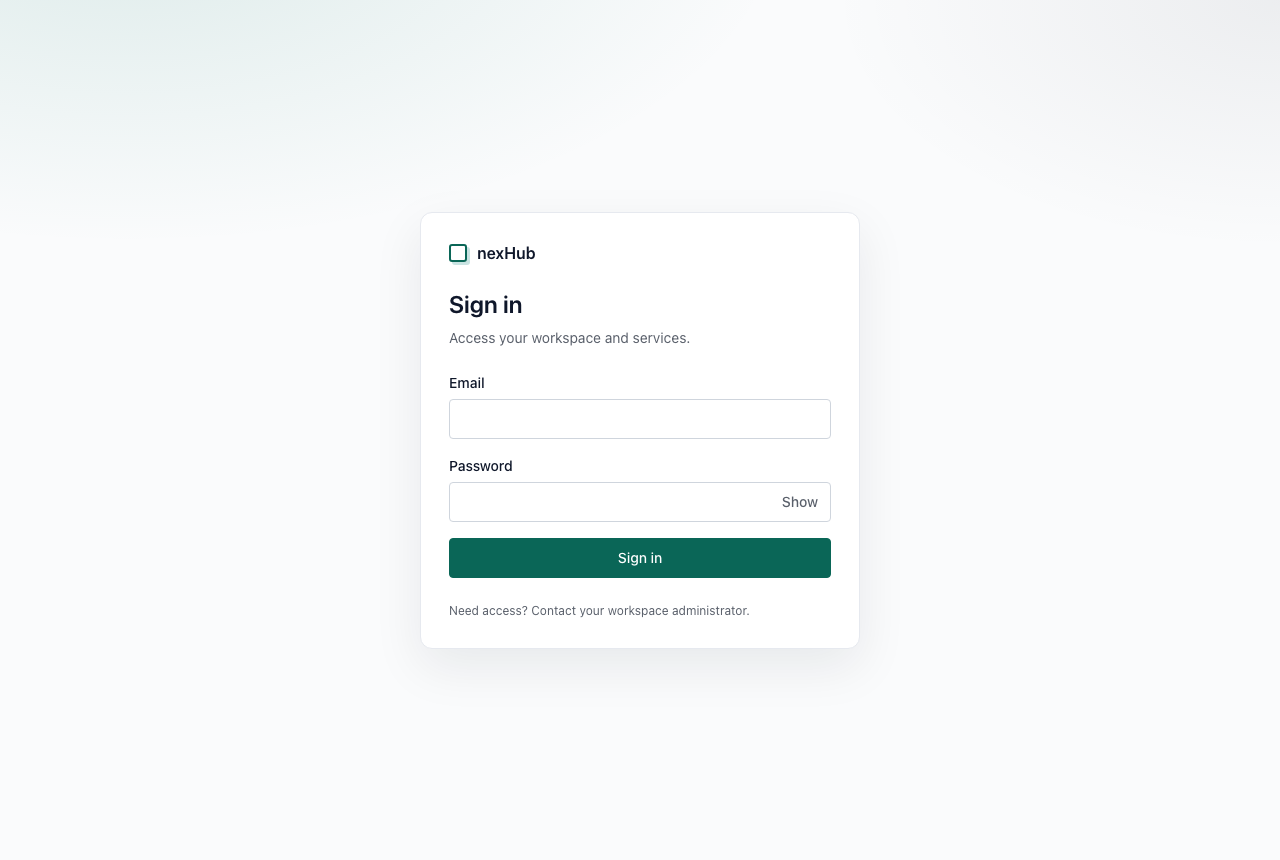
- Open hub.lab2.dataspacebuilder.com/login.
- Type your e-mail address in the field Email.
- Type your password in the field Password. To check what you typed, click Show.
- Click Sign in.
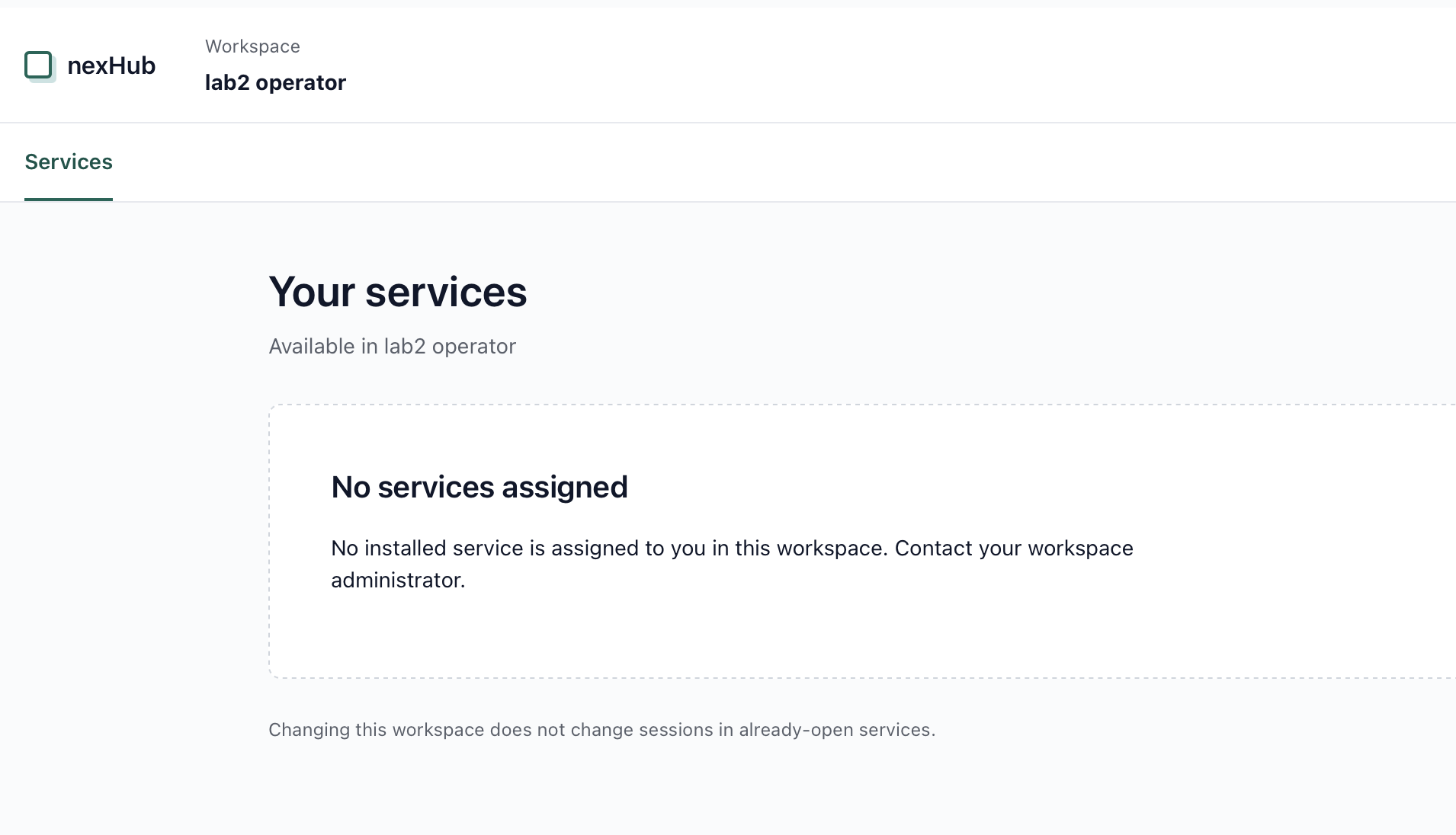
- nexHub opens. At the top, it shows your workspace. Below it shows the list Your services.
Open a service
- In nexHub, find the service in the list Your services.
- Click the service. It opens with single sign-on. You do not sign in again.
If you open ds.lab2… or dpp.lab2… directly, the service sends you to the nexHub sign-in. This is correct.
3. Current scope of lab2
| Function | Status |
|---|---|
| Sign in to nexHub | available |
| See your workspace | available |
| Start nexDS or nexDPP | not yet: the workspace needs an active Participant |
| Invite more users | not yet: needs the onboarding module and e-mail delivery |
| Onboard an organization as Participant | not yet: needs the onboarding module |
| Reset your password | not available: contact the lab2 team |
An active Participant has a DID, Credentials from the Issuer and a registration in the platform. The onboarding module creates this. The lab2 team adds it in a later step.
4. Typical problems
nexHub shows "No services assigned"
Your workspace has no service for you yet. This is the normal state in lab2 today. If you need a service, contact the lab2 team.
Sign-in fails
Make sure that the e-mail address is correct. Click Show and check the password. If the sign-in fails again, contact the lab2 team. lab2 has no "forgot password" function.
The page "Preparing sign-in" does not continue
Click Continue to sign in. If nothing happens, reload the page. Allow cookies for hub.lab2.dataspacebuilder.com, because the sign-in uses a session cookie.
A technical address shows "404" or an empty page
Technical interfaces have no start page. This is correct. Use nexHub.
Contact
lab2 team: nexyo, info@nexyo.io.
Adressen
| Adresse | Was es ist | Wer es nutzt |
|---|---|---|
hub.lab2.dataspacebuilder.com | nexHub: Anmeldung, Workspace, Start der Dienste | Menschen |
ds.lab2.dataspacebuilder.com | nexDS: Data-Space-Anwendung | Menschen, Start aus dem nexHub |
dpp.lab2.dataspacebuilder.com | nexDPP: Digitaler Produktpass | Menschen, Start aus dem nexHub |
oauth.lab2.dataspacebuilder.com | Anmeldedienst für Single Sign-On | Systeme |
nexus.lab2.dataspacebuilder.com | Laufzeit-API von Nexus | Apps und Agenten mit Token |
connector.lab2.dataspacebuilder.com | Connector für das Data-Space-Protokoll | Connectors anderer Participants |
identity.lab2.dataspacebuilder.com | Identity Hub: DIDs und Credentials | Andere Participants und Verifier |
issuer.lab2.dataspacebuilder.com | Issuer der Credentials | Andere Participants und Verifier |
2. Am nexHub anmelden
Sie brauchen eine E-Mail-Adresse und ein Passwort. Beides erhalten Sie vom lab2-Team. Eine Selbstregistrierung gibt es nicht.
- Öffnen Sie hub.lab2.dataspacebuilder.com/login.
- Geben Sie Ihre E-Mail-Adresse in das Feld Email ein.
- Geben Sie Ihr Passwort in das Feld Password ein. Wenn Sie die Eingabe prüfen wollen, klicken Sie auf Show.
- Klicken Sie auf Sign in.
- Der nexHub öffnet sich. Oben steht Ihr Workspace. Darunter steht die Liste Your services.
Einen Dienst öffnen
- Suchen Sie den Dienst im nexHub in der Liste Your services.
- Klicken Sie auf den Dienst. Er öffnet sich mit Single Sign-On. Sie melden sich nicht erneut an.
Wenn Sie ds.lab2… oder dpp.lab2… direkt öffnen, leitet der Dienst Sie zur Anmeldung im nexHub. Das ist richtig so.
3. Aktueller Funktionsumfang von lab2
| Funktion | Status |
|---|---|
| Am nexHub anmelden | verfügbar |
| Eigenen Workspace sehen | verfügbar |
| nexDS oder nexDPP starten | noch nicht: Der Workspace braucht einen aktiven Participant |
| Weitere Benutzer einladen | noch nicht: Dafür fehlen das Onboarding-Modul und der E-Mail-Versand |
| Eine Organisation als Participant aufnehmen | noch nicht: Dafür fehlt das Onboarding-Modul |
| Passwort zurücksetzen | nicht verfügbar: Wenden Sie sich an das lab2-Team |
Ein aktiver Participant hat eine DID, Credentials vom Issuer und eine Registrierung in der Plattform. Das Onboarding-Modul legt das an. Das lab2-Team ergänzt es in einem späteren Schritt.
4. Typische Probleme
Der nexHub zeigt „No services assigned“
Ihr Workspace hat noch keinen Dienst für Sie. Das ist heute der normale Zustand in lab2. Wenn Sie einen Dienst brauchen, wenden Sie sich an das lab2-Team.
Die Anmeldung schlägt fehl
Prüfen Sie die E-Mail-Adresse. Klicken Sie auf Show und prüfen Sie das Passwort. Wenn die Anmeldung erneut fehlschlägt, wenden Sie sich an das lab2-Team. lab2 hat keine Funktion „Passwort vergessen“.
Die Seite „Preparing sign-in“ geht nicht weiter
Klicken Sie auf Continue to sign in. Wenn nichts passiert, laden Sie die Seite neu. Erlauben Sie Cookies für hub.lab2.dataspacebuilder.com, denn die Anmeldung nutzt ein Sitzungs-Cookie.
Eine technische Adresse zeigt „404“ oder eine leere Seite
Technische Schnittstellen haben keine Startseite. Das ist richtig so. Nutzen Sie den nexHub.
Kontakt
lab2-Team: nexyo, info@nexyo.io.